
How to LoreBary: A Guide (OUTDATED)
LoreBary is an unofficial JAI extension that acts as a proxy bridge to multiple LLM providers. It allows you to add commands, lorebooks, and many other enhanced features to your roleplay. This is meant to be a condensed guide containing essential information for beginners. You can find more detailed explanations in the LoreBary Academy. Also, this guide is written under the assumption that the user already has knowledge of the basic workings of AI roleplay.
Index
Made by: Shuunami & Tissem
With assistance from: Wulong❤️Special thanks to LoreBary's dev team: Sophia, Wulong and Dong!!
E-mail: [email protected]
Proxy Set Up
Original providers:
1. Go to Sophia's LoreBary's Proxy Connection Hub.
2. Look for the provider you want and copy the corresponding proxy URL.
3. You can copy the model name from the provider's website (any model from the listed providers is available and can be used).
4. Put the LoreBary proxy URL link and the model name you copied in the corresponding fields in JAI's API Settings.
5. Input your API key from that specific provider.
6. Save Settings (both buttons) in JAI and refresh page.
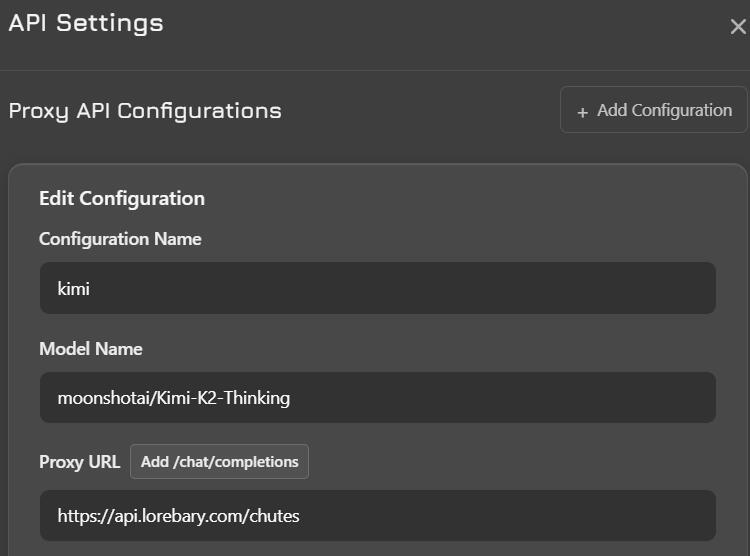
Your setup should look similar to this
Custom proxy
1. Go to Sophia's LoreBary's Proxy Connection Hub.
2. Choose the option that says "Cheating On Us?".
3. The provider/proxy you want to use must have their own curl, you can find that in their website. Copy it. It goes in the Endpoint URL field.
4. You can also copy the model name from the provider/proxy website. Keep it for later. It goes in JAI's API Settings.
5. Select the corresponding path to append.
6. Select API type (OpenAI, Gemini or Anthropic). Most APIs are the same type as OpenAI.
7. Click on the Create Proxy button. You should get a LoreBary proxy URL link.
4. Put the LoreBary proxy URL link and the model name you copied in the corresponding fields in JAI's API Settings.
5. Input your API key from that specific provider.
6. Save Settings (both buttons) in JAI and refresh page.
ⓘ Wondering how to use local models with LoreBary? There are a few extra steps, but worry not, here is a guide by Wayfarer.
How to use LoreBary's features?

When browsing LoreBary's libraries, find the content you want and copy the code. Paste that code into your custom prompt field, which can be found in the Proxy Configuration tab in JAI.Commands, plugins and lorebooks are all activated the same way: just copy the code and paste it in your 'Custom Prompt' field in JAI. You can place them either above or below your actual custom prompt.
ⓘ The features will NOT work unless your proxy URL belongs to LoreBary's permanent servers, i.e., the ones listed in Server Portal. Reason: the command code can only be correctly interpreted when going through those servers. To any other server, it looks like a random string of characters with no meaning. This is also the case for LoreBary's colab (you can manually enable a few commands there).Where to find the command library? Go to Server Commands.Pay attention to Plugin activation settings!
Where to find the Plugin Library? Plugin LibraryPay attention to Lorebook activation settings!
Where to find the Lorebook Library? Lorebook Library❗Note: you can also put codes in your chat memory, persona, and even bot definition! This way you can customize your roleplay per chat, persona, bot. Codes in custom prompt will affect all chats using that particular proxy configuration. Note that this will not allow you to bypass limits for each category!Important: if you put a code in chat, it can get pushed out of the context window after enough messages, so it's generally not recommended.
Command limitsCommands: 10
Plugins: 6
Lorebooks: 3
Scenario: 1
Character: 1
Persona: 1
Prompt: 1
Memory core: 1
Template: 1
Summary: 1
Are LoreBary's features enough for roleplay?No, the features aren't enough by themselves. You need to also use a custom prompt. Why? Most AI models, especially ones from big corporations, were not designed with roleplay in mind. This is why most AIs will need guidance on how to properly act as your roleplay partner. Additionally, custom prompts are a way to tailor the model's behavior to your own tastes. LoreBary features are not meant to replace your custom prompt, just complement it. Make sure that the features you choose don't overlap or contradict your custom prompt. Some recommended custom prompts here.So why use commands at all?Commands can fall into several categories: some simply add functionalities, like WEB SEARCH and CLAUDE CACHING, others help with filters, etc. However, there's many commands that are particularly effective in diversifying roleplay. Some commands, like for example NPC NEEDS and SLICE OF LIFE, aren't just a prompt. They're dynamic injections that will add events and situations to your story, making it richer and more exciting. Plugins can also do this with the correct settings.If you're wondering what commands/plugins/etc. you should use: select the ones that bring something your base custom prompt lacks, or if they help with certain undesirable model quirks. It's highly subjective, so the best way to find out what you like is to test them yourself.
Commands
Most commands are injections meant to enhance roleplay. LoreBary will inject them along with your last message, at the very bottom of your request. They can all be found in the Server Commands page. Just copy the command and paste it into your custom prompt. The limit is 10 commands, but a general recommendation is to use 3-5.You can check what each command does in their description. I've expanded on some special cases here.Adjusting commands
Some commands can be adjusted via parameters. For example, for NPC Needs, you can adjust the chance and intensity. Chance is a percentage. How to structure the parameters? For example, if you want to enable NPC Needs with MILD intensity and an activation chance of 40%, you should do: <NPCNEEDS/40/MILD>. If you don't set a specific chance, there is a default value that will be used.
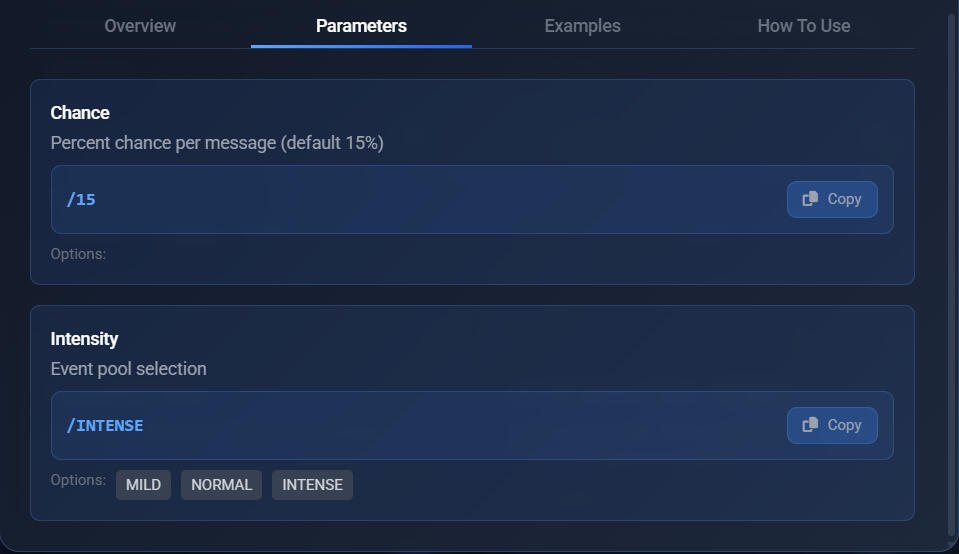
Jailbreaking methods
Commands such as JAILBREAK and the several PREFILL options serve to jailbreak AI models.ⓘ Don't use JAILBREAK together with any prefill, and only use one PREFILL command at a time.How do they work?
JAILBREAK: In simplistic terms, it's an injection that makes the AI disobey its guidelines.
PREFILL: It forces the AI to begin its response with whatever's written in the prefill, then the AI will continue from there. It's a very effective jailbreak method. However, some models don't react well to prefill and will break if you enable one, at least on JAI (e.g. DeepSeek, Grok).
❗Note: Remember, models like DeepSeek, Mistral, etc., are uncensored and don't need jailbreak nor prefill! In fact, using a jailbreaking method with an uncensored model might induce hallucinations, making the AI act like it's censored.
<MYSETTINGS>This is a special command that lets you see the features you've got enabled and active. To check them, send the command in chat and the bot will respond with a list of your active features (any feature that's command code reliant). This does NOT send a request to the AI.
The command doesn't work? Possible causes: you're not using the LoreBary URL, you're typing it wrong (typo, lowercase, etc.), or you're exceeding feature limits.
The output of this command will show you a list of features you're using, that means they're enabled. For plugins, you will also see their state: idle means the plugin is enabled but hasn't been triggered in this request, and active means it was triggered.
Plugins
Credit for this section: Tissem
There are two ways to create your own plugins: Guided Forge and Manual Forge.
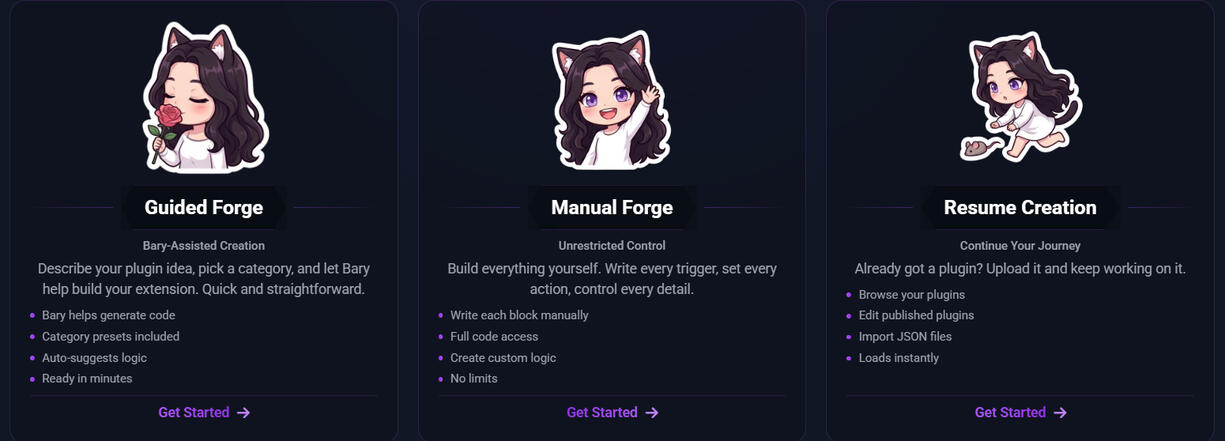
But before we go into explaining how to create a plugin, I should explain to you a few basics.